
Written by Quicklook · Sep 23, 2026 · 17 min read · 3,347 words
When Can an AI Automation Leave the Approval Queue?
Use this action-level test to decide whether an AI automation can run without approval—and what limits, evidence, and stop controls it needs.
TL;DR
An AI automation is ready to run without case-by-case approval only when one specific action has a clear boundary, has performed reliably on representative real work, cannot cause unacceptable harm within its limits, leaves a complete activity history, and can quickly hand work back to a named person. Do not put an entire workflow on autopilot at once. Give bounded authority to low-consequence actions while keeping approval on payments, promises, access changes, deletions, and other difficult-to-reverse decisions.
The automation is producing useful work. It drafts customer messages, fills CRM fields, schedules appointments, or recommends refunds. But every result lands in an approval queue, where it waits for someone to click a button.
That may be appropriate during a pilot. It is not necessarily a workable operating model. If a person must inspect every routine action indefinitely, the automation has moved the work rather than removed it. At the same time, turning off approval because the queue is inconvenient can expose customers, records, and money to mistakes.
The decision is not whether “the AI” is generally trustworthy. It is whether a specific action has earned bounded authority. Bounded authority means the automation can act only within stated limits—such as approved recipients, fields, amounts, times, and data sources—and must hand everything else to a person.
Use one standard: promote an action to automatic operation only when its consequences are contained, its observed failures are understood, and a named owner can see, interrupt, and reverse its work.
Approval should be a stage, not a permanent substitute for controls
Small and mid-size businesses are already considering more autonomous workflows. In an Upwork survey of 195 leaders at U.S. businesses with 10–99 employees, 34% were actively piloting AI agents for workflow automation and 30% for autonomous task execution. Sixty-two percent said they were very or extremely confident handing high-stakes tasks to agents. Those figures show appetite, not that any particular workflow is ready for autonomy. Security, compliance, and uncertain returns remained leading barriers in the same research (Upwork Research Institute).
Another survey, covering 402 U.S. technology decision-makers at companies with 5–499 employees, found that nearly one in three AI-using small and mid-size businesses remained stuck in experimentation (Pax8). An endless approval queue is one way a useful pilot gets stuck there.
Reviewing everything also does not guarantee good oversight. People can become accustomed to clicking approve, especially when most requests are routine. Anthropic describes action-level permission choices such as always allow, needs approval, and block, while warning that repeated prompts create friction and may eventually be tuned out (Anthropic). AWS similarly recommends approval based on risk rather than either reviewing everything or granting unbounded autonomy; it identifies missing context, missing timeouts, and approval fatigue as common problems (AWS).
A useful approval request should therefore be reserved for an actual decision. Routine, low-consequence actions should either be made safely automatic or removed from the workflow.
Give each action one of four autonomy modes
Do not assign one autonomy setting to an entire workflow. A single customer-service workflow might automatically retrieve an order, draft a response, require approval before promising a replacement, and block any request to change account access.
| Mode | What the automation may do | Appropriate use |
|---|---|---|
| 1. Recommend only | Analyze information and suggest a decision. It cannot create a finished external message or change another system. | Prioritizing leads, identifying possible duplicates, or recommending which invoices need review. |
| 2. Prepare a draft | Produce a message, record update, schedule, or proposed transaction, but create no external effect. | Drafting customer replies, social posts, refund explanations, or CRM changes. |
| 3. Act after approval | Prepare an exact action and execute it only after a person approves that action with enough context to make a real decision. | Sending a sensitive response, issuing a refund, changing record ownership, or scheduling a payment. |
| 4. Take bounded automatic action | Execute without case-by-case approval, but only inside explicit operating limits. Anything outside those limits stops or goes to a person. | Sending standard appointment reminders, adding source-backed CRM fields, or applying an approved low-risk classification. |
Mode 4 is not permission to “do whatever it thinks is best.” It is permission to perform one defined action under known conditions.
For example, a lead workflow could automatically append an industry field from an approved source, prepare a personalized introduction, and wait for approval before sending it. The safe operating mode follows the action and its consequences—not the name of the workflow or the apparent sophistication of the model.
Judge the consequence before judging the output quality
Start with the action the automation will take. Ask whether it can:
- •communicate with a customer, prospect, vendor, employee, or the public;
- •move, refund, charge, or commit money;
- •create a promise about price, timing, availability, eligibility, or service;
- •change, merge, overwrite, or delete business data;
- •grant, remove, or alter access to an account or system; or
- •create an outcome that is difficult, expensive, or embarrassing to reverse.
A “yes” does not automatically prohibit unattended operation. It raises the burden of proof.
A standardized appointment reminder is an external communication, but it may be suitable for bounded automatic action when the recipient, appointment status, template, timing, and opt-out status all come from reliable sources. A custom response to an angry customer is also an external communication, but its wording could create an unintended promise. That should usually remain a draft or approval action.
For every consequential action, ask two additional questions:
- •What is the plausible harm from one wrong action? Consider the wrong recipient, wrong amount, wrong record, wrong time, or wrong interpretation—not merely awkward wording.
- •Can the harm be contained and reversed? Reversibility means the previous state can be restored promptly without hidden effects. Deleting a draft record may be reversible; sending confidential information to the wrong recipient is not.
OpenAI’s practical guide to agents recommends human intervention particularly early in deployment and identifies exceeded failure thresholds and sensitive, irreversible, or high-stakes actions as reasons for approval or escalation. For a small business, the practical translation is simple: the harder a mistake is to undo, the less authority the automation should receive.
Require operating evidence before promotion
A polished demonstration is not enough. Promotion to bounded automatic action should depend on evidence from representative work and on controls that still function when the automation encounters missing data, a delayed service, or an unfamiliar case.
The job is narrow enough to state plainly
Write the job as one sentence: When this trigger occurs, use these sources to take this action in this system, within these limits.
“Handle scheduling” is too broad. “Send the approved reminder template to customers with a confirmed appointment tomorrow, except when the record is missing consent or has changed since the last schedule check” is testable.
The definition should identify:
- •allowed and forbidden actions;
- •approved source systems and fields;
- •eligible recipients or records;
- •operating hours or timing rules;
- •volume and dollar limits;
- •conditions that require a handoff; and
- •the safe response when required information is unavailable.
Real cases have been observed
Run the automation on historical or live cases without initially allowing it to create an external effect. This is often called shadow mode: the system records what it would have done while the existing process remains in control.
The test set should include ordinary work and known difficult cases: missing fields, duplicate records, conflicting instructions, unusual amounts, stale statuses, service interruptions, and customer replies the automation was not designed to interpret.
Track more than how often the final answer looked correct. Record:
- •cases the automation completed correctly;
- •cases a person edited or rejected;
- •cases it correctly handed off;
- •cases it should have handed off but did not;
- •duplicate or repeated actions;
- •failures caused by missing or outdated source data; and
- •failures caused by connected tools, rather than by the AI output itself.
Set the failure rules before reviewing the pilot. Some events—such as paying twice, messaging a suppressed contact, or changing the wrong user’s access—may be immediate stop events rather than errors to average into a general quality score. If the business has not defined what failure is acceptable and what failure stops the automation, it cannot determine that the test passed.
Source data is dependable
An automation cannot compensate reliably for a schedule, price list, customer status, or policy record that is routinely stale. Specify which system is authoritative when two sources disagree. If the required source is missing, unavailable, or too old, the automation should stop or hand off rather than guess.
Repeated attempts cannot multiply the damage
Connected systems sometimes time out after receiving an instruction. The automation may not know whether the action succeeded. A retry limit prevents it from attempting the same operation indefinitely.
The action should also be duplicate-safe, meaning that repeating the request does not send the same message twice, create two records, issue two refunds, or pay the same invoice twice. Each action should have a unique reference that the connected system can check before acting again.
A person can see, interrupt, and recover the work
The activity history should show, in plain language:
- •when the action occurred;
- •which customer, record, or transaction it affected;
- •which source information was used;
- •what action was requested and what actually happened;
- •whether a retry occurred;
- •why the automation acted or handed off; and
- •whether a person later changed or reversed the result.
There must also be a named owner, alerts for important failures, a visible stop control, and a fallback. A fallback is the safe behavior when the automation cannot continue—for example, leaving the record unchanged and assigning it to a person rather than inventing missing information.
Anthropic’s research on autonomy found that experienced users tend to move away from approving every action and toward monitoring and intervening. That approach depends on visibility and a practical way to interrupt the system (Anthropic). Microsoft’s 2026 Work Trend Index likewise found that advanced AI users were more likely to report documented, repeatable workflows, human handoffs, and quality standards. The finding is correlational, but it supports making these operating rules explicit before granting more authority (Microsoft).
How the test applies to common business actions
The appropriate mode can differ even between actions that appear similar.
| Action | Sensible starting mode | What could justify bounded automatic action |
|---|---|---|
| Lead enrichment | Prepare a draft or act after approval if the data affects outreach or qualification. | Limit the automation to adding named fields from approved sources. Preserve the original value, record the source, and hand off conflicts. Do not let enrichment automatically become outbound contact. |
| Customer messages | Prepare a draft for open-ended replies; act after approval for complaints, exceptions, promises, or sensitive information. | Use bounded automation only for narrow message types with approved wording, verified recipients, reliable status data, and rules that route replies or unusual cases to a person. |
| Appointment reminders | Act after approval during the initial test. | Confirm the appointment is still active immediately before sending. Restrict timing and templates, respect contact preferences, prevent duplicates, and hand replies or schedule conflicts to a person. |
| CRM updates | Depends on the field. | Adding a source-backed field or tag may be automatic. Merging records, deleting history, changing ownership, altering a sales stage with financial consequences, or overwriting a person’s notes should retain approval or stronger restrictions. |
| Social publishing | Prepare a draft or act after approval. | Narrow automatic publishing to preapproved formats using reliable source material. Stop when a post contains an unsupported claim, sensitive topic, unusual mention, changed offer, or data outside the approved source. |
| Refunds | Act after approval. | A narrow refund category may become automatic when eligibility comes from a clear policy, the original transaction is verified, dollar and frequency caps apply, duplicate refunds are blocked, and exceptions go to a named owner. |
| Invoice payments | Recommend or prepare the transaction, with approval before money moves. | Automatic payment carries a much higher burden. If used at all, limit it to preapproved vendors and expected recurring obligations, with verified payment details, amount and frequency caps, duplicate checks, alerts, and immediate escalation for any change. New vendors, changed bank details, and unusual amounts should remain human decisions. |
The useful unit of automation is often smaller than the full process. Fixed business rules can handle eligibility and limits, AI can interpret variable text or prepare a response, and a person can retain the consequential decision. That division is usually safer and easier to operate than handing an end-to-end process to one agent.
A 30-day path from observation to bounded authority
A staged rollout gives the owner evidence without making the first live test an irreversible action.
Days 1–7: Observe without acting
Run the automation in shadow mode. Define each action it proposes, its data sources, and its intended operating mode. Record where the proposed result differs from what a person actually did.
Use this period to find vague instructions and unstable source data. Do not solve those weaknesses by adding broad discretion to the prompt. Narrow the job or fix the source.
Days 8–14: Require approval and record the decision
Let the automation prepare the exact action, but require approval before it changes another system. The approval screen should include enough context to judge the action: recipient, amount, relevant source data, proposed change, and any uncertainty or missing information.
Record whether the person approved, edited, rejected, or redirected the action—and why. If reviewers routinely need information that the approval screen does not show, improve the workflow before considering autonomy.
Days 15–21: Grant limited authority to the lowest-consequence action
Choose one action that passed the consequence and evidence tests. Apply explicit limits for recipients, records, amounts, volume, hours, and source freshness. Keep higher-consequence actions in approval mode.
Enable alerts and the stop control before authority is granted. Confirm that timeouts do not cause duplicate actions and that out-of-bounds cases reach the named owner.
Days 22–30: Monitor routine work and inspect exceptions
Review every exception and a regular sample of completed routine actions. Compare the activity history with the connected systems rather than relying only on the automation’s own report.
Test the operating controls deliberately: pause the automation, simulate an unavailable source, submit a duplicate request, exceed a limit, and confirm that the work stops or hands off as intended.
At the end of the period, promote the action only if:
- •representative cases were observed;
- •routine failures remained within the limit set before the pilot;
- •no unresolved stop event occurred;
- •source data, retry behavior, caps, and duplicate protection worked;
- •every action can be inspected afterward;
- •exceptions reached the right person with enough context; and
- •the owner can stop the automation without waiting for a developer.
Promotion is not permanent. Move the action back to approval when failures cross the preset threshold or when there is a meaningful change to the instructions, model, source data, connected tool, business policy, or action limits.
Requirements to put in an automation brief
A software brief does not need to prescribe the technical design. It should make the operating decision testable. Include these requirements:
- •List each action separately. State what the system may recommend, draft, execute after approval, execute automatically, and never do.
- •Name the authoritative sources. Identify where customer status, prices, schedules, payment details, policies, and permissions come from—and what happens if those sources conflict or are unavailable.
- •Set boundaries. Specify eligible records and recipients, operating times, approved content, volume limits, dollar limits, and forbidden cases.
- •Define success and stop events. State how completed work will be checked, which routine failure level is acceptable, and which mistakes immediately pause the action.
- •Prevent repeated side effects. Require timeouts, retry limits, unique action references, and duplicate protection for messages, records, refunds, payments, and bookings.
- •Design the handoff. Name the person or role that receives exceptions, what context they receive, how quickly the case needs attention, and what the automation does while waiting.
- •Keep a readable activity history. Record sources, proposed and completed actions, connected-system responses, retries, approvals, overrides, and reversals.
- •Provide alerts and a stop control. The business owner or operator should be able to pause one action without shutting down unrelated work.
- •Plan for reversal. Preserve previous values where practical and document how messages, records, schedules, refunds, or other actions can be corrected.
- •State the promotion and demotion rules. Define what evidence moves an action from draft to approval or from approval to bounded automatic operation—and what sends it back.
If a vendor cannot show how those requirements will work in the actual application, the automation is not ready to operate without approval. A model demonstration answers whether the AI can produce an output. This brief answers whether the business can safely run the resulting process.
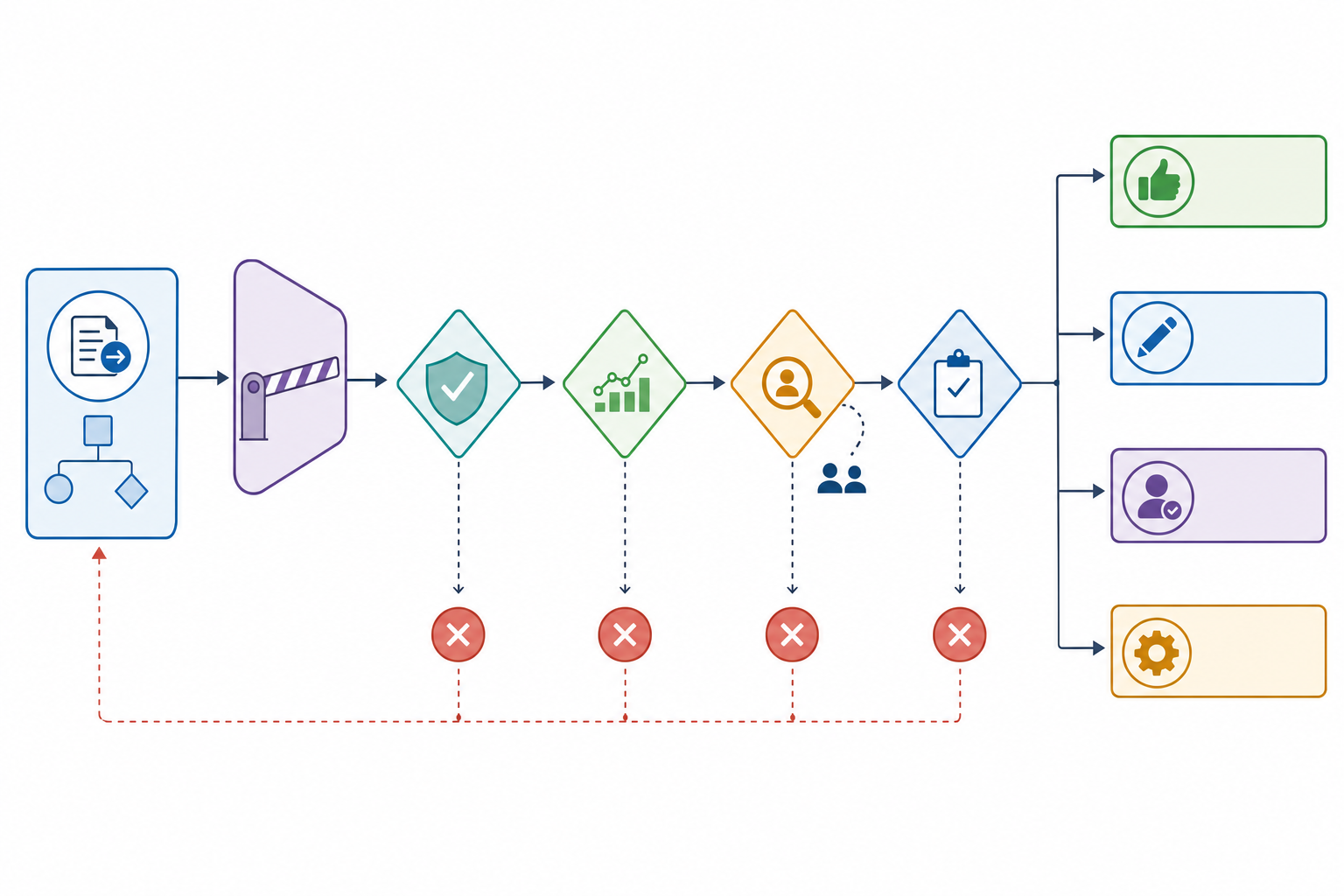
The action-level promotion test
Run this decision tree separately for every message, record change, booking, refund, payment, or other action. An entire automation should not receive one blanket autonomy setting.
1. Name the exact action
State the trigger, sources, tool, change, recipient, and intended result in one sentence. If the action is still described as “handle,” “manage,” or “take care of” an entire process, it is not bounded enough for automatic operation.
If the action cannot be stated precisely, keep it in recommend-only or draft mode. If it can, continue.
2. Apply the consequence gate
Ask whether the action communicates externally, moves money, creates a promise, changes or deletes data, affects access, or is difficult to reverse. Consider the harm from one wrong recipient, amount, record, or interpretation.
Keep sensitive, high-consequence, or hard-to-reverse actions behind approval. Lower-consequence actions can continue through the test.
3. Test whether the risk can be contained
Set allowed recipients, records, fields, amounts, volume, times, sources, and forbidden cases. Confirm that previous values can be restored where practical and that a repeated request cannot duplicate the action.
If meaningful limits or reversal are not possible, retain approval. If the plausible harm is contained within acceptable limits, continue.
4. Examine observed performance
Use representative real cases, including missing data, duplicates, conflicting instructions, unusual cases, and connected-tool failures. Track correct work, edits, rejected actions, missed handoffs, and stop events against thresholds set before the pilot.
Insufficient observation means the action remains in shadow, draft, or approval mode. Performance within the preset limits can continue.
5. Verify visibility and handoff
Confirm that the business has a readable activity history, a named owner, useful alerts, clear handoff rules, safe fallback behavior, retry limits, and an accessible stop control.
Without visibility and intervention, do not grant automatic authority. With those controls working, the action can be considered for promotion.
6. Grant only bounded authority
Enable automatic operation only for the tested conditions. Continue sampling completed work and reviewing every exception. Retest after meaningful changes to instructions, models, connected tools, source data, policies, or limits.
The action enters bounded automatic mode. Crossing a failure threshold or operating limit immediately returns it to approval or stops it.
Conclusion
An AI automation is ready to run without human approval when a specific, low-enough-consequence action has earned bounded authority—not when the overall system seems impressive. The action needs a narrow job, reliable source data, representative testing, known failure limits, duplicate protection, caps, a complete activity history, a named owner, handoff behavior, alerts, and a stop control.
Key Takeaways
- ✓Assign autonomy action by action rather than putting an entire workflow on autopilot.
- ✓Keep approval on sensitive, irreversible, high-consequence, or poorly observed actions.
- ✓Treat external messages, promises, money movement, deletions, access changes, and difficult reversals as higher-burden decisions.
- ✓Use real-case observation and preset failure rules rather than confidence or a polished demonstration.
- ✓Automatic operation must remain visible, interruptible, limited, and ready to hand work back to a person.
- ✓Demote and retest the action when its data, tools, instructions, policies, or failure pattern changes.
Next Steps
Pick one action currently waiting in an approval queue and run it through the promotion test. If the workflow needs purpose-built limits, handoffs, activity history, and operating controls, review Quicklook’s custom development service.
Start one conversation about the brief, the constraints, and whether Quicklook is the right studio.